The short answer is yes—Crushon AI absolutely has voice capabilities, and they’re more sophisticated than you might expect.
Text chatting can feel a bit restrictive. That’s why so many users are switching to voice—they want to hear characters speak, dive deeper into roleplay, and enjoy a more natural conversation. Plus, it’s the perfect way to avoid those overwhelming walls of text!
But why do many people say that Crushon AI doesn’t have voice functionality? It has voice capabilities, but does Crushon AI have voice messages? These questions are normal, and I will answer them for you using the information I’ve found.
Does Crushon AI Have Voice Features?
Yes, Crushon AI includes voice-related functionality, but it might be different from what you imagine.
You may have the following questions:
- Can the AI send spoken replies?
- Can I receive voice messages from characters?
- Can I talk to the AI using my microphone?
- Can I use character voices or AI voice actors?
- After creating your character with Crusoon AI, how do you get the AI voice on TikTok?
There are many questions about Crushon AI Voice, but don’t worry, I will answer them for you by introducing the features of Crushon AI Voice.
Voice Output
Crushon AI supports voice replies, but the character doesn’t directly reply with voice. Instead, after generating a text reply, you choose a voice tone for the character, and the character will use that voice tone to repeat the text message. This is significantly different from Siri on the iPhone.
You can’t send voice messages to AI. This is because parsing user voice is complex; the AI would need to translate your speech, then create a response and body language that match the character’s specific personality. This process is extremely cumbersome, and Crushon AI currently does not support it.
Crushon AI comes with a variety of built-in AI voices, which you can choose for your virtual character. You can use external voice-overs, but you must have the legal right to use those voices. To avoid copyright issues, please do not post Crushon AI’s character voices on TikTok.
Now you should know the answers to the questions above.
Can the AI send spoken replies?
No, Crushon AI does not support sending messages by voice.
Can I receive voice messages from characters?
Yes
Can I talk to the AI using my microphone?
No
Can I use character voices or AI voice actors?
It is recommended to use only the AI voice provided by Cruson AI.
After creating your character with Crushon AI, how do you get the AI voice on TikTok?
Crushon AI’s voiceovers are not currently supported on TikTok.
Enabling and Using Voice on Crushon AI
The process of activating voice features on Crushon AI is straightforward:
- Enter a Chat: Select any character and open the chat window
- Set Up Voice: Tap the Voice button in the chat input area
- Choose a Tone: Pick from the available voice options (some are premium-only)
- Play Voice: Tap the Voice button below any message to listen to it
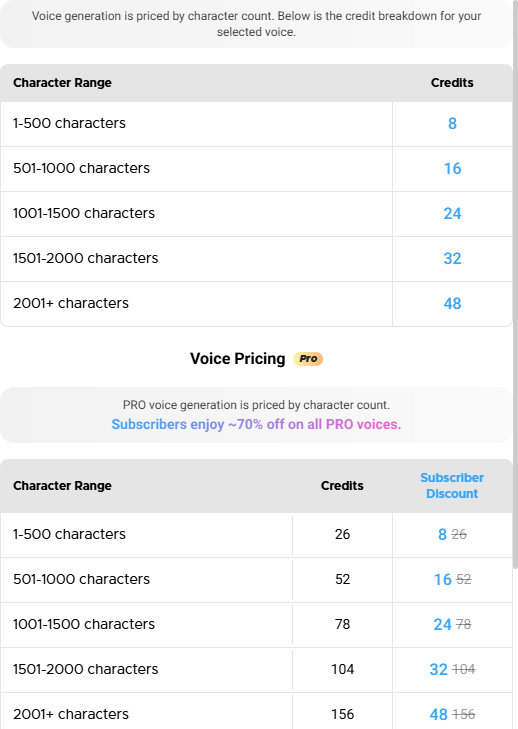
It’s worth noting that “the voice feature consumes Message Credits, and the credit cost varies depending on the selected voice”. This means that while basic voice functionality might be available to free users, extensive use or access to premium voices requires a subscription.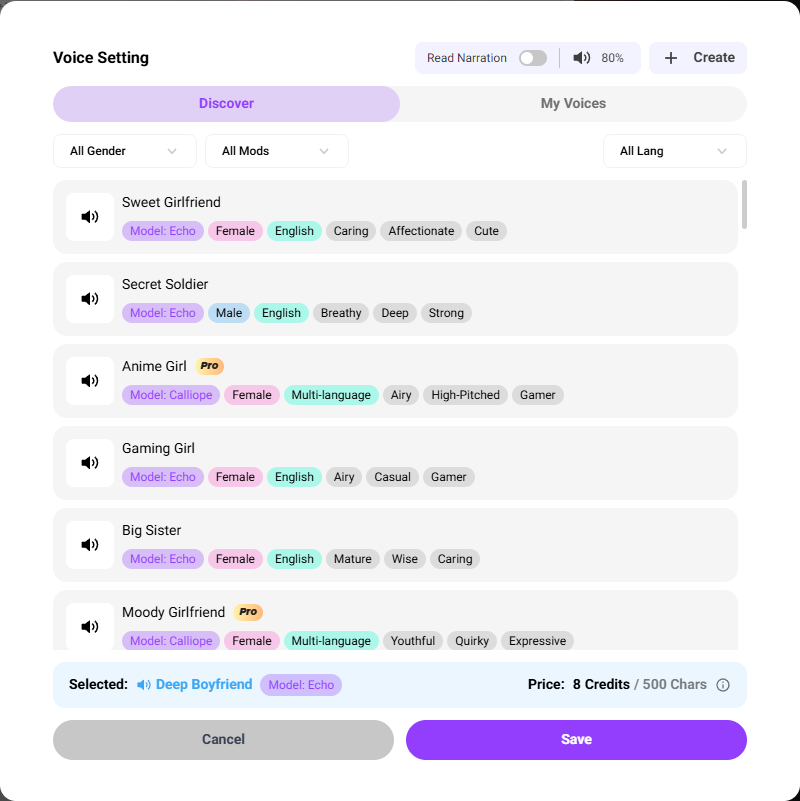
The price of Crushon AI voice
Crushon AI’s speech generation is charged per character; free users can use the non-professional version, while paid users can use the professional version.
The non-professional version is priced at 8 credits/500 chars and 16 credits/1000 chars. The more characters the character speaks, the more expensive it is.
Subscribers enjoy approximately a 70% discount on all Pro Voice services. This means that for subscribers, the Message Credits consumed by using Pro Voice are the same as those consumed by using regular Voice. It sounds like a great deal
Create Voice by Crushon AI
This is a testing feature of Crushon AI. You can upload a sound you’re interested in, and the AI will simulate that sound clip to create a new AI voice.
Create Voice Requirements:
- Audio clips must be between 10 and 300 seconds long.
- Supports uploading audio in mp3, wav, and m4a formats.
- It is recommended to use high-quality audio clips.
- Audio file size: up to 20MB
- The right to upload and clone these audio samples is required.
Steps to Create Voice
- Select Model: Currently, only the Calliope model is supported.
- Upload Audio: If the audio specifications exceed the requirements, some editing is required.
- Voice Name: Give the new AI voice a name to distinguish it from other AI voices.
- Gender: Select a voice gender for the AI voice.
- Tags: Select up to 3 tags. Tags are the fastest way to understand a voice type.
- Confirm Permission: You must have the right to upload this voice clip for AI training.
- Submit: After uploading, wait for a while, and the new AI voice will appear.
Why do some users think that Cruson AI lacks voice functionality?
In fact, Cruson AI only launched its voice function in 2025; it did not have voice functionality in the previous two years.
Cruson AI’s late arrival in the market is primarily due to the sheer number of roles it handles; equipping each role with a unique AI voice would be incredibly cumbersome. Therefore, in March 2025, Cruson AI finally found a solution: offering a selection of AI voices for users to choose from. This approach significantly reduced the technical complexity. Currently, the available AI voices can meet the needs of most AI roles.
My feelings
I tried out Crushon AI’s voice function, and I think it’s not perfect yet, considering it’s only a new feature launched a year ago.
First, Character voices don’t play instantly like WhatsApp messages. It requires a certain amount of time to generate, similar to DeepSeek, where it needs time to process the voice before it can be played. This delay feels awkward.
Secondly, although Cruson AI supports multiple languages , including English, Portuguese, German, Hindi, Indonesian, Spanish, Filipino, French, Polish, Italian, Japanese, Korean, Arabic, and Chinese, English has the most voice types, while other languages have relatively fewer voice types.
Lastly, pricing is a concern. Cruson AI has raised its subscription rates again and introduced new voice-based fees. While these are paid in tokens rather than cash, they still represent an added cost for users.
So, would I still recommend Crushon AI?
Honestly, I recommend it. Crushon AI’s unfiltered mode is unique and difficult for other platforms to replicate. It’s suitable for finding AI companions or creating role-playing games. Although the voice function isn’t great right now, I’m willing to wait; perhaps in another year, its voice features will be much richer.
This is just my opinion. If you’re interested, you can click to Crushon AI download and try it out.