Creating a character in Crushon AI is easy, but when you want to permanently delete AI character, there doesn’t seem to be a delete button.
Two years ago, you couldn’t delete the Crusoon AI character you created, but now you can delete it directly on the homepage.
How to Delete a Crushon AI Character AI account?
While interfaces may change slightly after updates, the general steps are usually similar.
How to Delete a Crushon AI Character on PC
- Log into your Crushon AI account using your credentials on the official website.
- Click “Profile”: All the characters you’ve created will appear here. This also shows your character’s earnings, trade points, and message points.
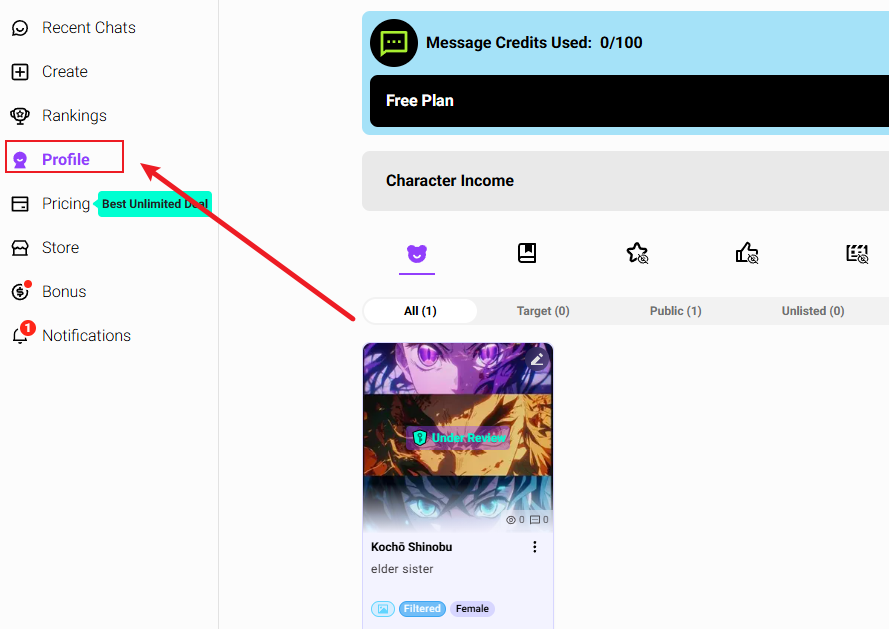
- Select the character to delete: Browse your character list and click on the specific character you wish to remove.
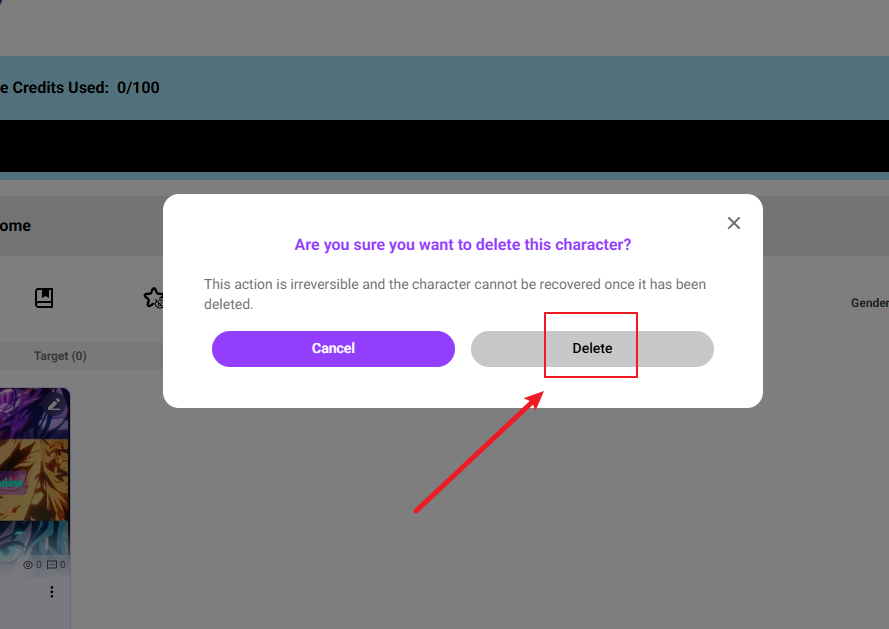
- Click the three dots in the bottom right corner: To delete a character, click the three dots in its bottom right corner and select Delete.
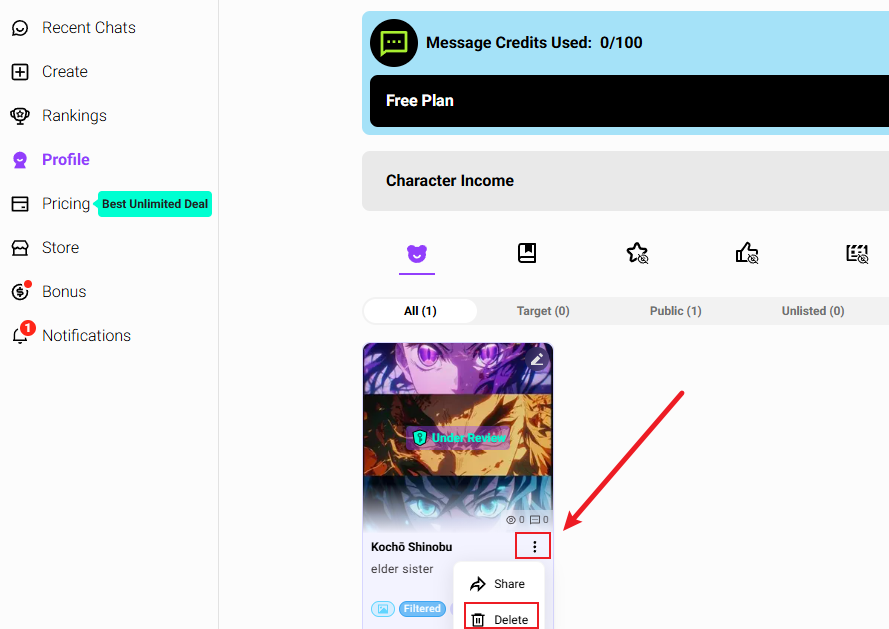
- Confirmation prompt: When you select to delete a character, Crushon AI will display a confirmation prompt. Click “Confirm“.
How to Delete a Crushon AI Character on Mobile
The process on mobile devices follows similar principles:
- Open the Crushon AI app and log in.
- Access your character list through the main menu or profile section.
- Tap on the character you wish to delete.
- Look for delete options in the character settings (often represented by three dots).
- Confirm the deletion when prompted.
Can I recover a deleted character?
No, deleting a character is permanent. Once you confirm the deletion, you cannot get it back.
Important Considerations Before Deleting Characters:
- Associated data: When you delete a character, its chats, settings, and saved information are usually lost.
- Subscription implications: If you’re approaching character limits for your subscription tier, deleting characters frees up slots for new creations.
- Backup considerations: Before deleting, save a copy or take a screenshot of any important chats or details you want to keep.
How to Permanently Delete Your Crushon AI Account
For users looking to completely remove their presence from Crushon AI, account deletion is the nuclear option. This process removes all your data—characters, conversations, preferences, and account information.
While interfaces change over time, the process usually involves:
- Access your profile settings: Log into your Crushon AI account and navigate to your profile page.
- Find account settings: Look for “Settings” or “Account Settings” within your profile interface.
- Locate deletion option: Scroll to find the “Delete Account” option, which is found at Profile > Settings > Delete Account.
- Follow confirmation process: You will likely have to confirm your choice several times, and you may also need to check your email for a confirmation link.
- Cancel active subscriptions: If you have an active paid subscription, cancel it first through the appropriate platform (Subscribestar for web, Apple App Store or Google Play for mobile) to avoid further charges.
- Data deletion timeline: Once initiated, your account data enters a deletion queue. According to privacy documentation, all your data—including chats, customized bots, and memories—are wiped out permanently after 30 days.
Critical Pre-Deletion Steps:
- Backup important conversations: If you have meaningful dialogues you want to preserve, export or screenshot them before deletion.
- Document payment records: Take screenshots of subscription details, payment confirmations, and cancellation receipts.
- Remove shared content: Delete any characters or content you’ve shared publicly if you’re concerned about ongoing visibility.
- Check connected services: Ensure you’re not using Crushon AI credentials for other services.
Can You Recover a Deleted Character or Account?
This is likely the most important question for people who deleted something by mistake or changed their minds.
Account Recovery:
Based on Crushon AI’s official FAQ, you can only recover a deleted account within three days. After this period, it is impossible to get the account back. This short window exists because the platform uses a “soft deletion” process, where data is hidden but not immediately erased from the system.
Character Recovery:
This cannot be recovered, so please proceed with caution before deleting. If this character is important to you, you can try contacting customer service.
Common Issues and Troubleshooting
Character Won’t Delete
If a character refuses to delete:
- Verify you’re the creator/owner of the character
- Check for active conversations or pinned content associated with the character
- Ensure stable internet connection
- Contact Crushon AI support if issues persist
Can’t Delete Account
- Active subscription: You must cancel any active subscriptions first
- Unstable connection: Poor internet can interrupt the deletion process
- Platform restrictions: Some account types might have additional requirements
- Technical issues: Platform bugs or maintenance periods
FAQ
Q: How can I ensure ALL my data is really gone when I delete my account?
A: You can verify if your account was deleted by logging into the Crushon AI desktop app as a guest. If the characters you created no longer appear in a search, your data has likely been removed.
Q: Will deleting characters free up space or improve performance?
A: Character deletion primarily affects your account organization rather than performance. Free users have 10 character slots, Standard 20, Premium 50, Deluxe 100.
Q: What’s the difference between removing a profile card from a chat versus deleting it permanently?
A: Remove from chat: Pause using a profile card for a specific chat. You can then decide to either save your changes to the original card or delete them. Permanent deletion: Irreversibly removes the profile card from your account entirely
Final Thoughts: Deleting AI Characters Is Easy
Crushon AI has changed over the last two years, making it much easier to create and delete characters.
Every character you create reflects your experiences and inspirations. If there’s no reason to delete a character, why not keep them?