Artificial intelligence chat platforms are becoming more powerful every year, but many of them require paid subscriptions or expensive API access. Fortunately, you can still use Janitor AI for free if you know the right setup.
In this guide, you’ll learn how to use Janitor AI for free, how JanitorLLM works, how to connect OpenRouter Free Models, and which options belong to the Best Free LLM APIs 2026. We’ll also cover the latest Janitor AI Update March 2026 so you know what has changed. 
What Is Janitor AI?
Janitor AI is an AI chatbot platform designed for creating and chatting with custom AI characters. Unlike traditional AI chat tools, it allows users to design personalities, conversation styles, and story-based interactions.
The platform itself does not always provide the AI model directly. Instead, it connects to external language models through APIs such as:
- JanitorLLM
- OpenRouter models
- Other LLM APIs
This means the cost of using Janitor AI depends mainly on the AI model you connect to it.
What Is JanitorLLM?
JanitorLLM is the official AI model option built specifically for the Janitor AI platform.
Key characteristics include:
- Optimized for roleplay and character conversations
- Designed to work directly inside Janitor AI
- Simple setup with no external API configuration
- Often provides limited free usage tiers
For beginners, JanitorLLM is usually the easiest way to start using Janitor AI for free.
Method 1: Use JanitorLLM
This is the simplest way to use Janitor AI for free.
Step 1: Create a Janitor AI Account
Go to the official Janitor AI website and create an account using:
- Google login
- Discord login
After logging in, you will see the main chat interface.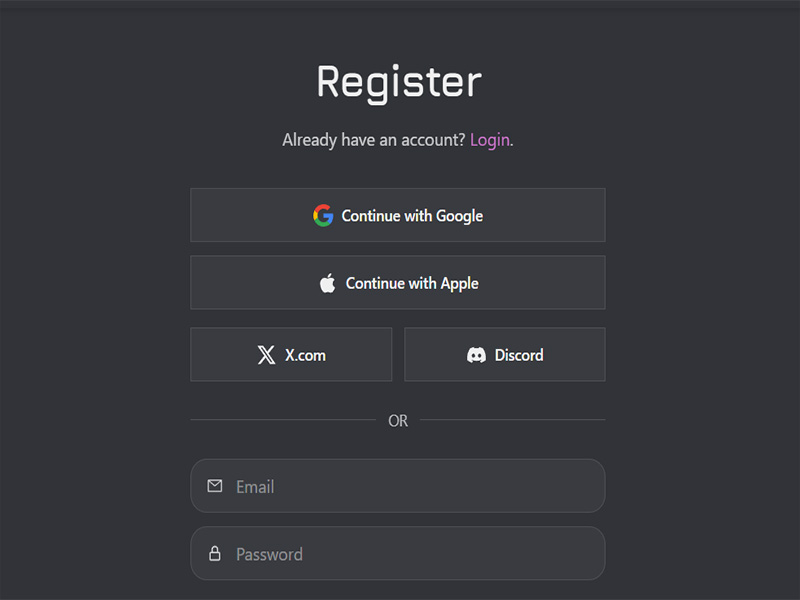
Step 2: Choose a Character
Browse the public character library or create your own AI character.
Characters define:
- Personality
- Background story
- Conversation style
Step 3: Select JanitorLLM
When starting a chat:
- Open Chat Settings
- Choose JanitorLLM as the model
- Start chatting
You can now use Janitor AI without adding any external API key.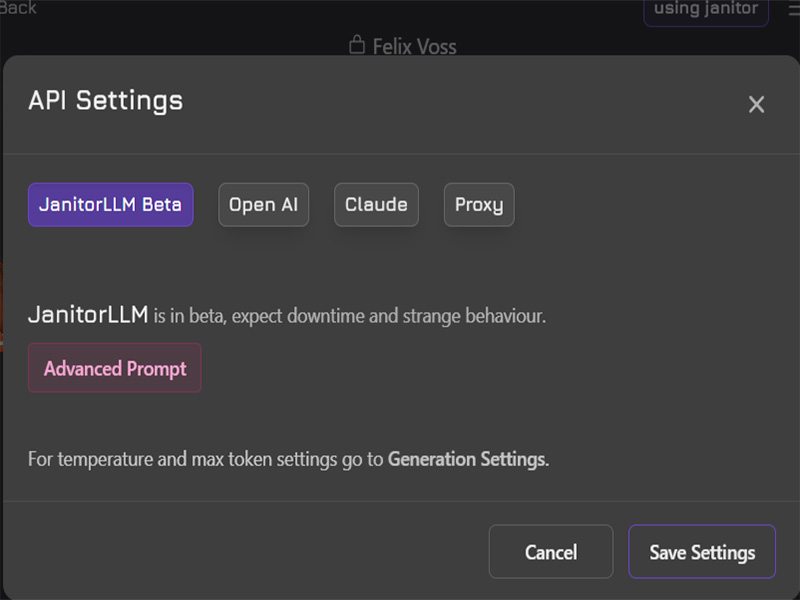
Method 2: Use OpenRouter Free Models
Another popular way to use Janitor AI for free is by connecting OpenRouter Free Models.
OpenRouter acts as a gateway that gives access to multiple LLM providers through one API.
Why Use OpenRouter?
Benefits include:
- Access to multiple AI models
- Free usage tiers
- Easy API management
- Often included in the Best Free LLM APIs 2026
Step 1: Create an OpenRouter Account
Visit the OpenRouter website and sign up.
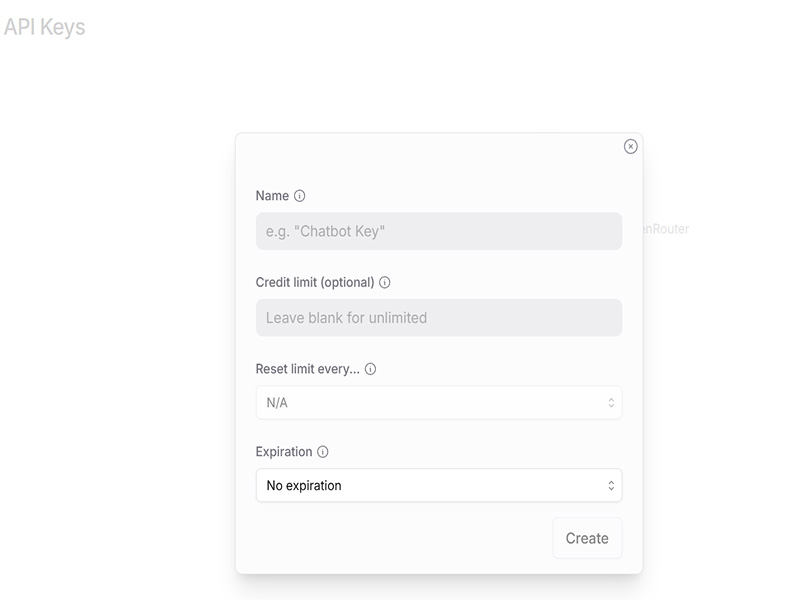
Once logged in:
- Go to API Keys
- Generate a new API key
- Copy the key
Step 2: Add the API Key to Janitor AI
In Janitor AI:
- Open API Settings
- Choose OpenRouter
- Paste your API key
- Save the settings
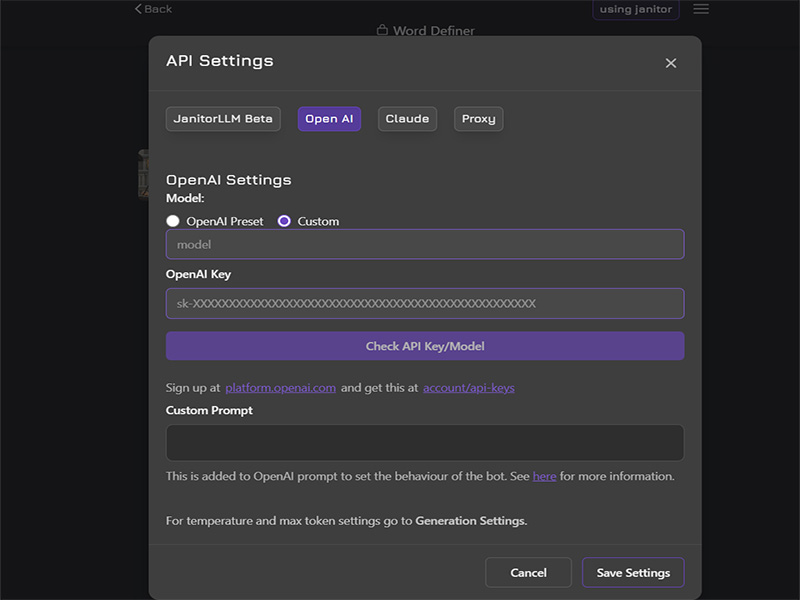
Step 3: Select a Free Model
Choose one of the available OpenRouter Free Models when starting a chat.
Free models may include lightweight versions of popular LLMs optimized for lower cost.
Best Free LLM APIs 2026
If you want to use Janitor AI without paying, these options are often considered the Best Free LLM APIs 2026.
1. JanitorLLM
Best for beginners.
- Built directly into Janitor AI
- No external setup
- Free access options
2. OpenRouter Free Models
Best for flexibility.
- Multiple AI models
- Centralized API
- Often offers free usage tiers
3. Community LLM Endpoints
Advanced users sometimes run or access:
- community-hosted models
- lightweight open-source LLMs
These require more technical setup but can also be free.
Janitor AI Update March 2026
The Janitor AI Update March 2026 introduced several improvements focused on stability and model compatibility.
Improved JanitorLLM Performance
Responses are now:
- faster
- more stable
- better at long conversations
Better OpenRouter Integration
The platform now supports:
- more OpenRouter models
- improved API reliability
- smoother model switching
Enhanced Character Memory
Characters can now maintain longer conversation context, making roleplay interactions more natural.
Tips to Use Janitor AI for Free Longer
Free AI usage often comes with limits, but you can extend your usage with a few simple tips.
Choose Lightweight Models
Smaller models consume fewer tokens and allow longer free usage.
Avoid Very Long Prompts
Shorter prompts reduce token usage.
Clear Chat History
Long conversation histories increase token consumption.
Try Multiple Free APIs
If one free model reaches its limit, switching APIs may allow continued access.
Common Problems and Fixes
API Not Working
Possible reasons:
- Incorrect API key
- Model not selected
- API quota exceeded
Check your API settings and verify your key.
Slow Responses
Solutions:
- switch to a lighter model
- reduce conversation length
- try a different API provider
Final Thoughts
Using Janitor AI for free is completely possible with the right setup. The easiest option is JanitorLLM, which requires no external configuration. If you want more flexibility, connecting OpenRouter Free Models is a great alternative and one of the Best Free LLM APIs 2026.
With the improvements introduced in the Janitor AI Update March 2026, the platform has become more stable, faster, and easier to use than before.
Whether you want AI roleplay, character chat, or creative storytelling, Janitor AI remains one of the most flexible AI chat platforms available today.